Photon support and connection diagnostics
Diagnose local network permissions, inspect per-brand Wake-on-LAN standby paths, verify Android TV Remote v2 TLS certificates, or reach our engineering team directly with a privacy-redacted Connection Doctor report.
Interactive brand standby and Wake-on-LAN configurator
Many televisions disable their Wi-Fi or Ethernet interface in deep energy-saving sleep. Select your television or streaming device below to view the exact standby setting from BrandGuidance.swift, the hardware wake mechanism, IME keyboard notes, and volume behavior.
Sony Bravia (Google TV and Android TV)
Enable Remote start on your Sony Bravia so it keeps its network interface listening while in standby.
Settings / Network & Internet / Remote start / On (Powered on by apps)
TCL Google TV (QM8, Q7, S5, and C-Series)
Enable Screenless service (or Quick Start) so your TCL Google TV stays reachable on Wi-Fi when turned off.
Settings / System / Power & Energy / Screenless service / On (and Quick Start / On)
Hisense Google TV (U8N, U7N, U6N, and Laser TV)
Turn on Wake on Wireless Network and Wake on Cast so your Hisense TV responds to Wake-on-LAN and remote power commands.
Settings / System / Power & Energy (or Advanced System) / Wake on Cast & Wake on Wireless Network / On
NVIDIA Shield TV and Shield TV Pro
Enable Wake on local network and HDMI-CEC One-touch play on your NVIDIA Shield to wake both the Shield and your TV panel.
Settings / Device Preferences / System / Wake on local network / On (and Display & Sound / Power control / CEC One-touch play)
Google TV Streamer (4K) and Chromecast with Google TV
Chromecast with Google TV and Google TV Streamer stay reachable in standby and wake your television display via HDMI-CEC.
Settings / Display & Sound / HDMI-CEC / Enable; Settings / System / Power & Energy / Never turn off network
Walmart onn 4K Pro and onn Google TV 4K
Keep HDMI-CEC enabled on your Walmart onn 4K Pro so waking the streamer also turns on the television display.
Settings / Display & Sound / HDMI-CEC / Enable; Settings / System / Power & Energy / Turn off display / Never
Philips Android TV and Ambilight OLED
Enable Switch On with Wi-Fi (WoWLAN) so your Philips Android TV can be powered on from your iPhone instead of entering deep eco sleep.
Settings / Wireless and Networks / Wired or Wi-Fi / Switch On with Wi-Fi (WoWLAN) / On
Xiaomi Mi Box S and TV Box S (2nd Gen)
Xiaomi Mi Box S turns off its Wi-Fi radio completely in deep standby. Network wake is not supported from deep sleep unless Stay awake is enabled.
Settings / Device Preferences / Developer options / Stay awake (or wake once with physical Bluetooth remote)
Uncertified Android TV / AOSP Box
Enable Networked Standby (or Wake on LAN) and HDMI-CEC in your Android TV box settings so it remains reachable when turned off.
Settings / System / Power & Energy / Networked Standby / Wake on LAN / On
Troubleshooting reference and protocol error matrix
Every failure state in Photon maps to a deterministic check in Doctor.swift and LaunchResolver.swift. Filter by symptom, error code, or protocol layer below.
| symptom in photon | diagnostic signal | root cause | deterministic fix |
|---|---|---|---|
| Local Network permission denied (-65570) | kDNSServiceErr_PolicyDenied (-65570) | iOS blocked multicast Bonjour discovery (_androidtvremote2._tcp) and local TCP sockets for Photon. | Open iOS Settings, select Privacy & Security, select Local Network, and enable the switch next to Photon. |
| Pairing code rejected locally (SHA-256 first-byte mismatch) | ATVError.badCode (Polo port 6467) | The 6-character hexadecimal PIN entered does not match the expected first byte of SHA256(modulus_tv || exp_tv || modulus_client || exp_client || code[1..2]). | Check the 6-character hex code (0-9, A-F) shown on your TV screen; Photon rejects typos locally before transmitting the secret so the TV does not cancel the PIN dialog. |
| Certificate pin mismatch after TV factory reset | ATVError.pinMismatch (TOFU SHA-256) | Your TV was factory-reset or had its Android TV Remote Service app storage cleared, rotating its self-signed X.509 leaf certificate on port 6466. | Tap Re-pair in the Photon banner or Connection Doctor to clear the old SHA-256 pin and complete a fresh 6-character hex pairing. |
| Another phone is connected (Session busy) | ATVError.busy (TCP port 6466) | Certain Android TV firmware builds (such as Xiaomi Mi Box S) allow only one active phone controller socket on port 6466 at a time. | Close the remote session on the other iPhone, iPad, or Mac in your household, then tap Retry in Photon. Your pairing pin remains intact. |
| YouTube or Netflix custom on-screen keyboard | RemoteImeShowRequest / Mask 683 | YouTube, Netflix, and Prime Video often render custom canvas keyboards that do not emit standard Android EditorInfo text fields, or TCL/Shield hides the TV keyboard when IME support is advertised. | Use the D-pad or Swipe Pad for custom canvas grids, or toggle Use TV's own keyboard in Photon Settings (feature mask 683) to keep the TV's native keyboard visible. |
| August/October 2026 Play Store v52.6 app launch changes | LaunchResolver R20 / R22 chain | Google Play Store v52.6+ on Android TV deprecated silent market://launch?id= intents for certain packages and may drop the port 6466 socket when an unsupported URI scheme is sent. | Photon's LaunchResolver automatically walks the fallback chain (deepLinks to market://launch to market://details?id=<pkg> + DPAD_CENTER) and silently reconnects within milliseconds if a scheme drops the socket. |
| Legacy Remote Service v1 detected | _androidtvremote._tcp (v1 only) | The television is advertising the legacy v1 service without the Protobuf v2 service (_androidtvremote2._tcp). | On your TV, open Google Play Store, search for Android TV Remote Service, and install the latest update. |
| Different network subnets or VPN active | DoctorCheckKind.subnetMatch / vpn | Your iPhone is connected to a Guest Wi-Fi VLAN with AP client isolation, or an active VPN tunnel (utun) is capturing local 192.168.x.x routes. | Join the primary home Wi-Fi SSID on both devices and enable Allow Local Network (LAN Bypass) in your VPN settings. |
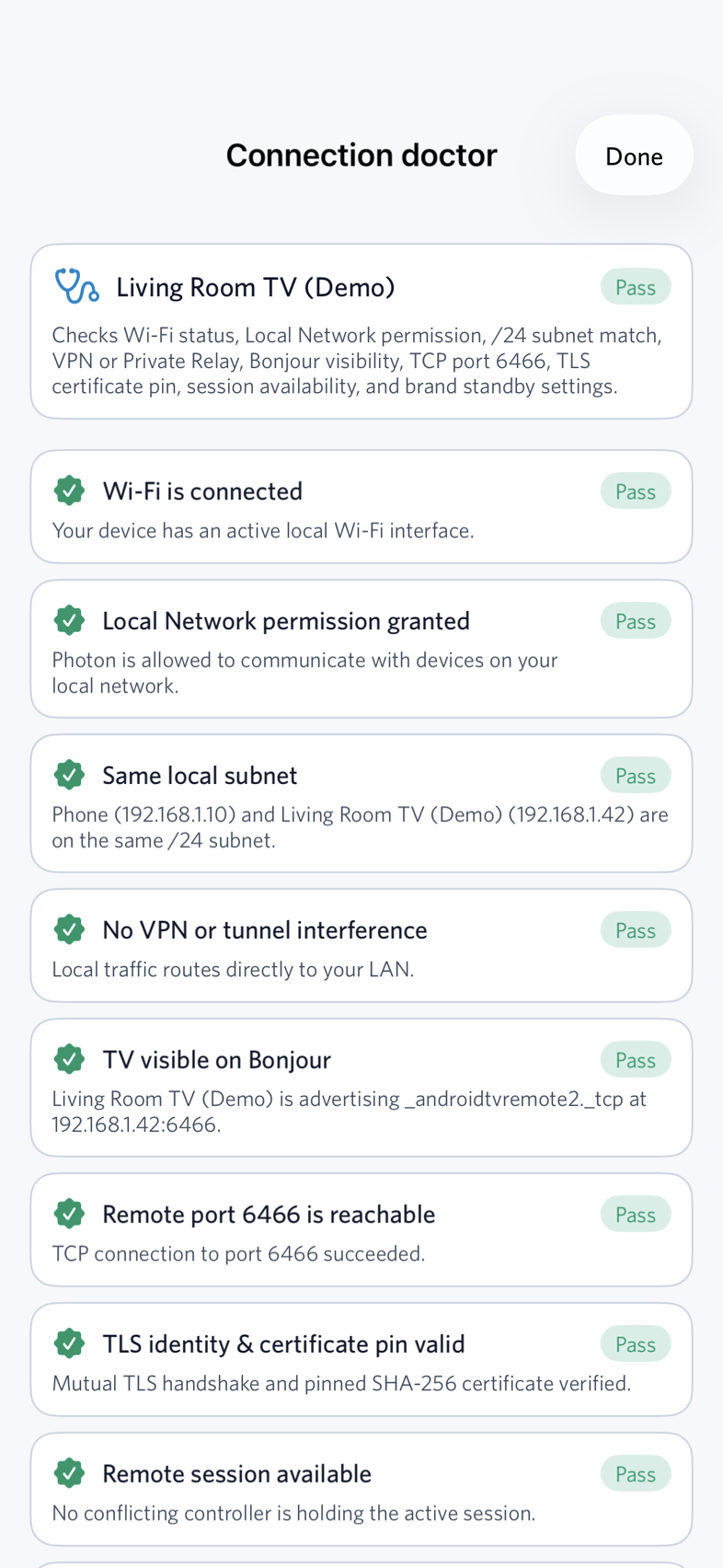
Interactive Connection Doctor redacted report previewer
When you tap Copy report in Connection Doctor, Photon automatically masks IPv4 host octets, hardware MAC addresses, and SHA-256 certificate pins on your device before copying to the clipboard. Toggle below to compare the raw in-memory diagnostics against the redacted output that is safe to email to support@auraone.com.
=== Photon Connection Doctor Report ===
Timestamp: 2026-10-15T19:42:10Z
OS: iOS 18.1 (Build 22B83)
TV Name: Living Room Bravia XR
TV Brand: Sony Bravia
TV Model: XR-65A80L
TV IP: 192.168.1.***
TV MAC: AA:BB:CC:**:**:**
TV Pin: SHA256:9f86d081...[REDACTED]

Checks:
1. [PASSED] wifiStatus: Wi-Fi is connected
   Detail: Your device has an active local Wi-Fi interface.
2. [PASSED] localNetworkPermission: Local Network permission granted
   Detail: Photon is allowed to communicate with devices on your local network.
3. [PASSED] subnetMatch: Same local subnet
   Detail: Phone (192.168.1.***) and Living Room Bravia XR (192.168.1.***) are on the same /24 subnet.
4. [PASSED] vpnOrPrivateRelay: No VPN or tunnel interference
   Detail: Local traffic routes directly to your LAN.
5. [PASSED] bonjourVisibility: TV visible on Bonjour
   Detail: Living Room Bravia XR is advertising _androidtvremote2._tcp at 192.168.1.***:6466.
6. [PASSED] tcpReachable: Remote port 6466 is reachable
   Detail: TCP connection to port 6466 succeeded.
7. [PASSED] tlsAndPin: TLS identity & certificate pin valid
   Detail: Mutual TLS handshake and pinned SHA-256 certificate (SHA256:9f86d081...[REDACTED]) verified.
8. [PASSED] sessionBusy: Remote session available
   Detail: No conflicting controller is holding the active session.
9. [PASSED] standbyDeepSleep: Sony Bravia is awake and responsive
   Detail: Tip for waking from standby (Remote start): Settings / Network & Internet / Remote start / On (Powered on by apps)